Clioos › Guides › PDF to Excel
How to Convert PDF to Excel
The fastest free way is a browser tool: upload the PDF, check the extracted table, download a clean .xlsx. It works best on bank statements — here is the exact flow, tested.
At a glance
- Upload your PDF at PDF Probe — the first 10 pages are free, no account needed.
- It reads statement-style tables best: columns for Date, Description and Amount (or Withdrawals / Deposits), with a Balance column.
- A table with different headers comes back empty — check the preview before you download.
- Download .xlsx or .csv. Amounts are numbers and dates are real dates.
- For a generic table that isn't a bank statement, Excel's own PDF import is the better tool (see below).
Steps
- Open PDF Probe at clioos.com/pdf/.
- Drop your PDF on the upload area (or click to choose a file). Files must be under 10 MB and 20 pages or fewer.
- Wait while it extracts — a one-page digital statement takes a few seconds; a scanned page takes longer while OCR runs.

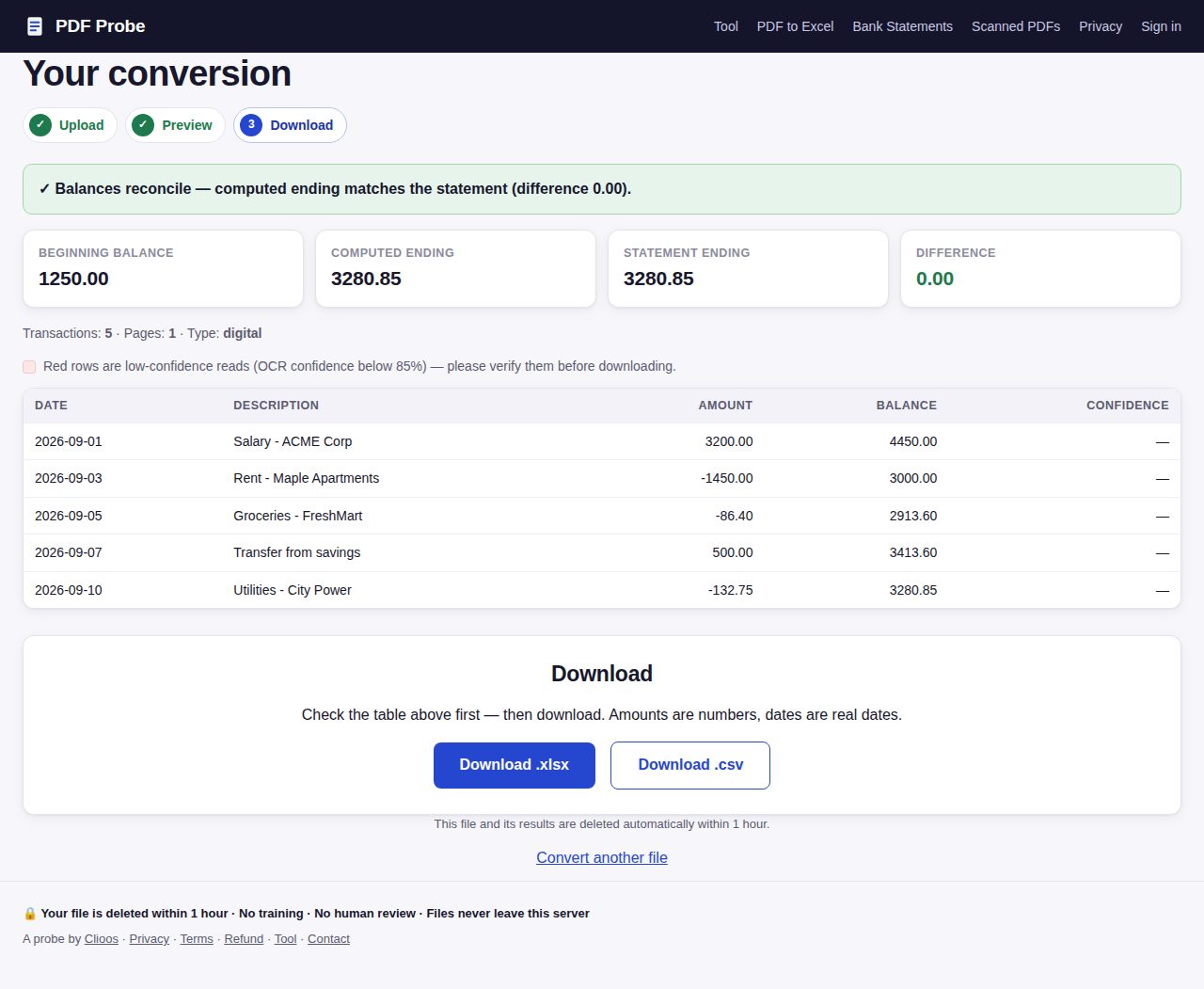
The upload area at clioos.com/pdf/ with the synthetic test statement selected. Screenshot of the live tool, 28 October 2026. - Check the preview. It shows the extracted table, highlights low-confidence rows in red, and for statements shows a balance reconciliation (Beginning, Computed ending, Statement ending, Difference).
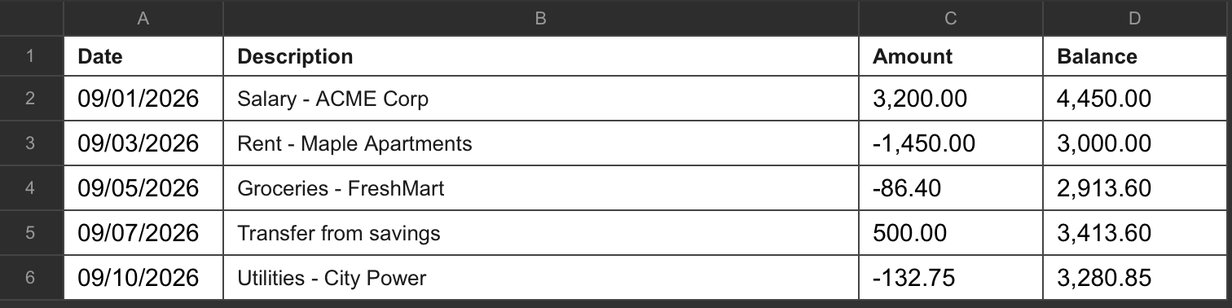
- Click Download .xlsx (or .csv). The workbook has two sheets: Transactions and Summary.
Worked example (tested 27 October 2026)
I tested this with a one-page digital bank statement (5 transactions: salary, rent, groceries, a transfer, utilities). Upload → preview in a few seconds → all 5 rows extracted with exact amounts and running balances. The reconciliation read: Beginning $1,250.00, Computed ending $3,280.85, Statement ending $3,280.85, Difference $0.00. A 12-row Chase-style statement extracted 12 out of 12 the same way.
| Date | Description | Amount | Balance |
|---|---|---|---|
| 9/1/2026 | Salary - ACME Corp | $3,200.00 | $4,450.00 |
| 9/3/2026 | Rent - Maple Apartments | -$1,450.00 | $3,000.00 |
| 9/5/2026 | Groceries - FreshMart | -$86.40 | $2,913.60 |
| 9/7/2026 | Transfer from savings | $500.00 | $3,413.60 |
| 9/10/2026 | Utilities - City Power | -$132.75 | $3,280.85 |
What it can't do (tested)
- Generic tables: a table headed Date / Item / Category / Amount returned an empty sheet — the tool only recognises statement-style headers.
- Debit / Credit columns: a statement that splits money into Debit and Credit columns (instead of one Amount column) returned 0 rows.
- ISO dates: dates written as 2026-09-01 aren't read. US-style dates (9/1/2026) are.
- Free pages are spent per upload, even if the table comes back empty — check the format list above before you upload.
- Scanned pages need a clean scan — see how to convert a scanned PDF to Excel.
Free alternatives, honestly compared
- Excel's built-in import (Microsoft 365 or Excel 2019+): Data → Get Data → From File → From PDF. It detects any table in the PDF, not just statements — the best option for a generic table. Needs a paid Office copy.
- Google Sheets has no PDF import. Workaround: upload the PDF to Google Drive, open it with Google Docs (Drive converts it and tables come through), then copy the table into Sheets. Works, but usually needs cleanup.
- Smallpdf and iLovePDF both offer free PDF-to-Excel conversion for generic tables, with a daily free limit. Neither does statement reconciliation.
Frequently asked questions
Is it really free to convert PDF to Excel?
Yes, for the first 10 pages — no account, no card. After that, one-time page packs start at $9 for 100 pages. Uploads and results are deleted automatically within an hour.
Do I need to install anything?
No. It runs in the browser. Your PDF is processed on the server and deleted within an hour.
Why did my Excel file come back empty?
The table headers weren't recognised. The tool reads statement-style tables (Date, Description, Amount or Withdrawals/Deposits, Balance). Debit/Credit columns, ISO dates (2026-09-01) and non-statement tables all return empty. The preview shows the transaction count before you download, so check it first.
Will the numbers be usable in Excel?
Yes. Amounts download as numbers and dates as real dates, so SUM, filters and pivot tables work right away. The workbook has a Transactions sheet and a Summary sheet with the balances and reconciliation.
Related guides: How to convert a bank statement PDF to Excel · How to convert a scanned PDF to Excel · PDF Probe vs DocuClipper · All guides · Tool: PDF Probe