Clioos › Guides › PDF to Excel
How to Convert a Bank Statement PDF to Excel
A bank statement PDF becomes a clean spreadsheet in about a minute: upload it, check the reconciliation, download the .xlsx. This guide uses the exact format the converter reads — and shows you what to do when the numbers don't match.
At a glance
- Upload your statement at PDF Probe — first 10 pages free, no account.
- It works on US-style statements: Date, Description, Amount (or Withdrawals / Deposits), Balance, with dates like 9/1/2026 and Beginning / Ending Balance labels.
- The preview reconciles the balances for you: Beginning + transactions should equal the statement's Ending balance.
- If the Difference isn't $0.00, check the red low-confidence rows first, then compare the row count with the PDF.
- Statements are deleted within an hour of upload.
Steps
- Download the statement PDF from your bank (most banks offer a PDF download from online banking).
- Open PDF Probe and upload the PDF (under 10 MB, 20 pages or fewer).
- Wait for the preview. Digital statements take a few seconds; scanned statements take longer (OCR).

The reconciliation box on the preview page for the worked-example statement (synthetic test file). Difference $0.00 means every row was read and the amounts add up. Screenshot of the live tool, 28 October 2026. - Check the reconciliation box: Beginning balance, Computed ending, Statement ending, Difference. If the Difference is $0.00, every row was read and the amounts add up.
- Scan the table for red rows — those are low-confidence reads. Compare them with the PDF and fix them in Excel after downloading.
- Download .xlsx. The Transactions sheet has Date, Description, Amount and Balance; the Summary sheet has the balances and the reconciliation.
Worked example (tested 27 October 2026)
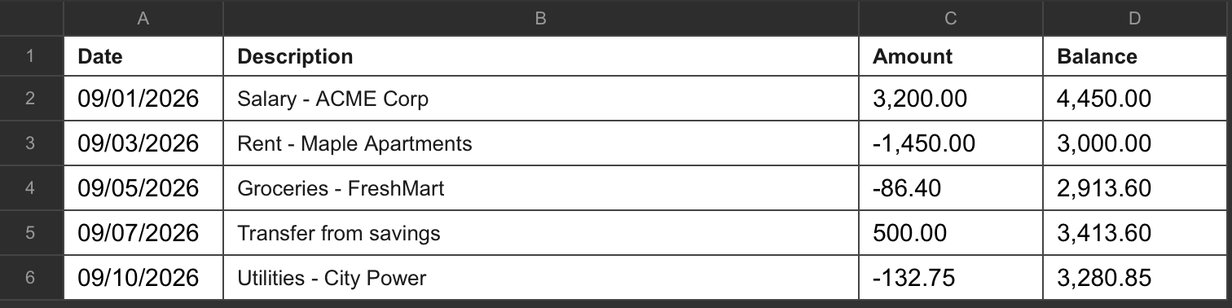
I tested this with a one-page September statement (5 transactions). The preview found all 5 rows with exact amounts and running balances, and the reconciliation read Beginning $1,250.00 → Computed ending $3,280.85 → Statement ending $3,280.85 → Difference $0.00. A 12-row Chase-style statement extracted 12 out of 12; an 11-row scanned Chase statement extracted 11 out of 11.
| Date | Description | Amount | Balance |
|---|---|---|---|
| 9/1/2026 | Salary - ACME Corp | $3,200.00 | $4,450.00 |
| 9/3/2026 | Rent - Maple Apartments | -$1,450.00 | $3,000.00 |
| 9/5/2026 | Groceries - FreshMart | -$86.40 | $2,913.60 |
| 9/7/2026 | Transfer from savings | $500.00 | $3,413.60 |
| 9/10/2026 | Utilities - City Power | -$132.75 | $3,280.85 |
When the numbers don't match
- Difference isn't $0.00: usually one row was misread (a red low-confidence row) or missed entirely (a multi-line description split across two lines). Compare the row count in the preview with the statement, fix the wrong cells in Excel — don't re-upload the same file and spend another free page.
- Preview shows 0 transactions: the layout isn't recognised. The usual causes: Debit/Credit columns instead of one Amount column; dates written as 2026-09-01 instead of 9/1/2026; a statement format the reader doesn't cover. Your bank's PDF download (rather than a print-to-PDF) is the most likely to work.
- A scanned statement that returns 0 rows: the scan is the problem — see how to convert a scanned PDF to Excel for what makes a scan readable.
What the .xlsx contains
- Transactions sheet: one row per transaction — Date, Description, Amount, Balance. Amounts are numbers and dates are real dates, so you can sum, filter and pivot right away.
- Summary sheet: page count, statement type, beginning and ending balances, and the reconciliation (computed ending vs. statement ending, and the difference).
Frequently asked questions
Which banks' statements work?
The converter is built around the common US layouts — Chase, Bank of America and Wells Fargo style: Date, Description, Amount (or Withdrawals/Deposits), Balance. Other US banks with the same columns usually work; check the preview — it shows the row count before you download.
What does the reconciliation check?
It adds your opening balance to every transaction and compares the result with the ending balance printed on the statement. A $0.00 difference means every row was read and the amounts add up. A non-zero difference means a row was misread or missed.
Is it safe to upload a bank statement?
Uploads and results are deleted automatically within an hour, and nothing is used for training or reviewed by a person. If you'd rather not upload a real statement, the format above is all the converter needs.
My statement is a scan, not a download. Does that work?
Yes, if the scan is clean — see the scanned-PDF guide. A straight, high-contrast scan of a standard statement converts; a skewed or faint one may come back empty.
Related guides: How to convert PDF to Excel · How to convert a scanned PDF to Excel · PDF Probe vs DocuClipper · All guides · Tool: PDF Probe